Dr Fones AI

Dr Fones AI · Model DF-AIM01

AI MOUSEWork away from your desk. Just speak.

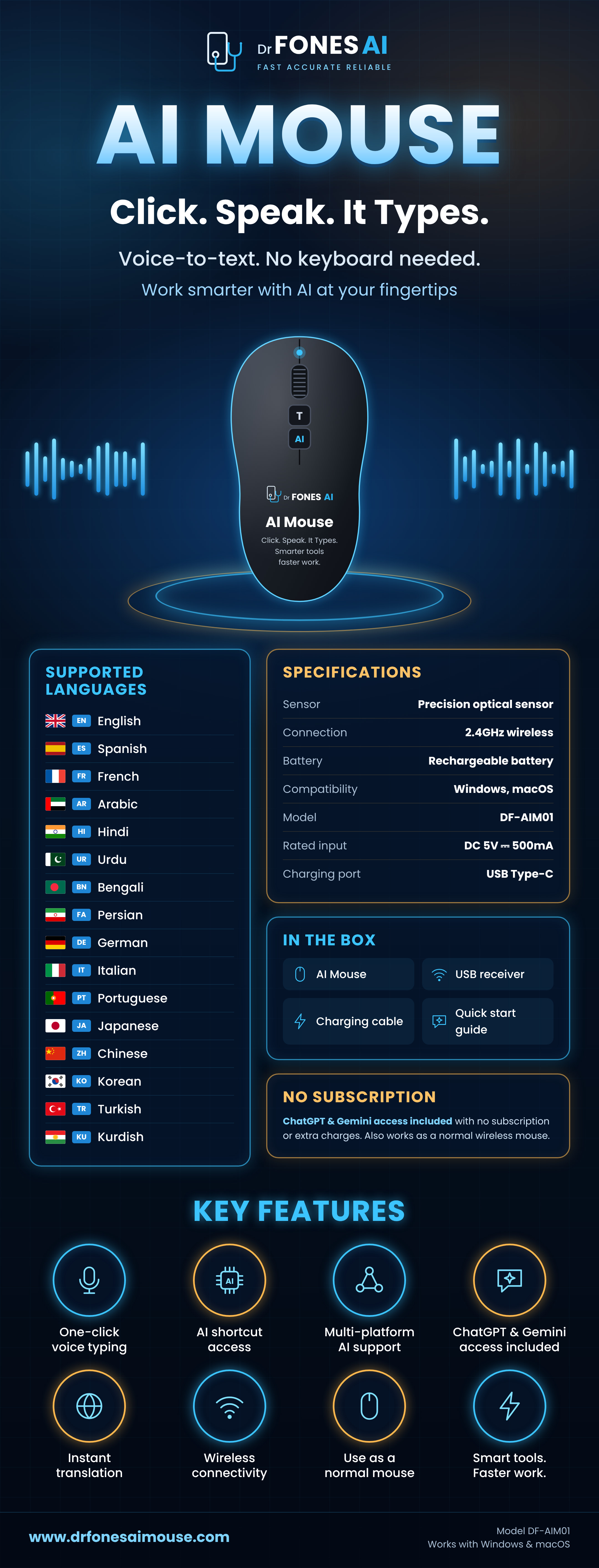
Click. Speak. It Types. Voice-to-text. No keyboard needed.

Work smarter with AI at your fingertips

Shop link to be added. Buy now opens the contact section for now.

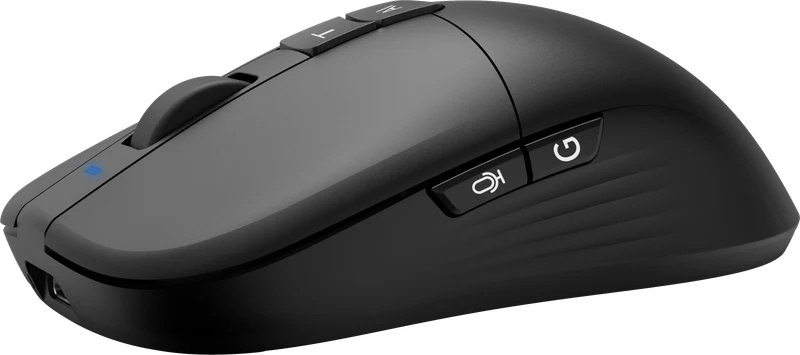
Dr Fones AI Mouse, side view showing the Voice and G buttons and the T and AI buttons behind the wheel

A wireless mouse with AI built in. Hold one button, speak naturally, and your words appear as text wherever your cursor is. Translate as you talk in 17 languages. ChatGPT and Gemini access is built in from the factory, with no subscription.

  • 17 languages
  • No subscription
  • Windows & macOS
  • Also a normal mouse
17languages for voice typing & translation
0subscriptions to pay for the built-in AI
4extra buttons: Voice, T, AI and G
2systems: Windows & macOS

Why we built it

Made for people who don't stay at the desk.

The founder's story

The Dr Fones AI Mouse started with a simple problem: work does not only happen sitting at a desk. We wanted to answer messages and write emails while walking, standing up, or making a coffee, without going back to the keyboard.

So we built a mouse you can speak to, and tested it the way we work: dictating while walking around the office, standing up and making a coffee. The English came out accurate, and the connection held at more than 25 metres from the computer.

25 m+WIRELESS RANGE

Wireless range depends on the environment.
A gift for a friend

One of the first AI Mice went to a friend as a gift. Within minutes of plugging it in, they were speaking their messages instead of typing them. Today it is part of their working day, and they tell everyone how much time it saves.

See it in action

Hold the button. Speak. Done.

Short clips of the AI Mouse at work, at the desk and away from it. Tap the speaker for sound.

At the desk: pick it up, speak, and the words are typed.
Eyes closed, still working

Watch the full video

0:44, with sound. Press play.

Dr Fones AI app

The free app that makes the mouse smart.

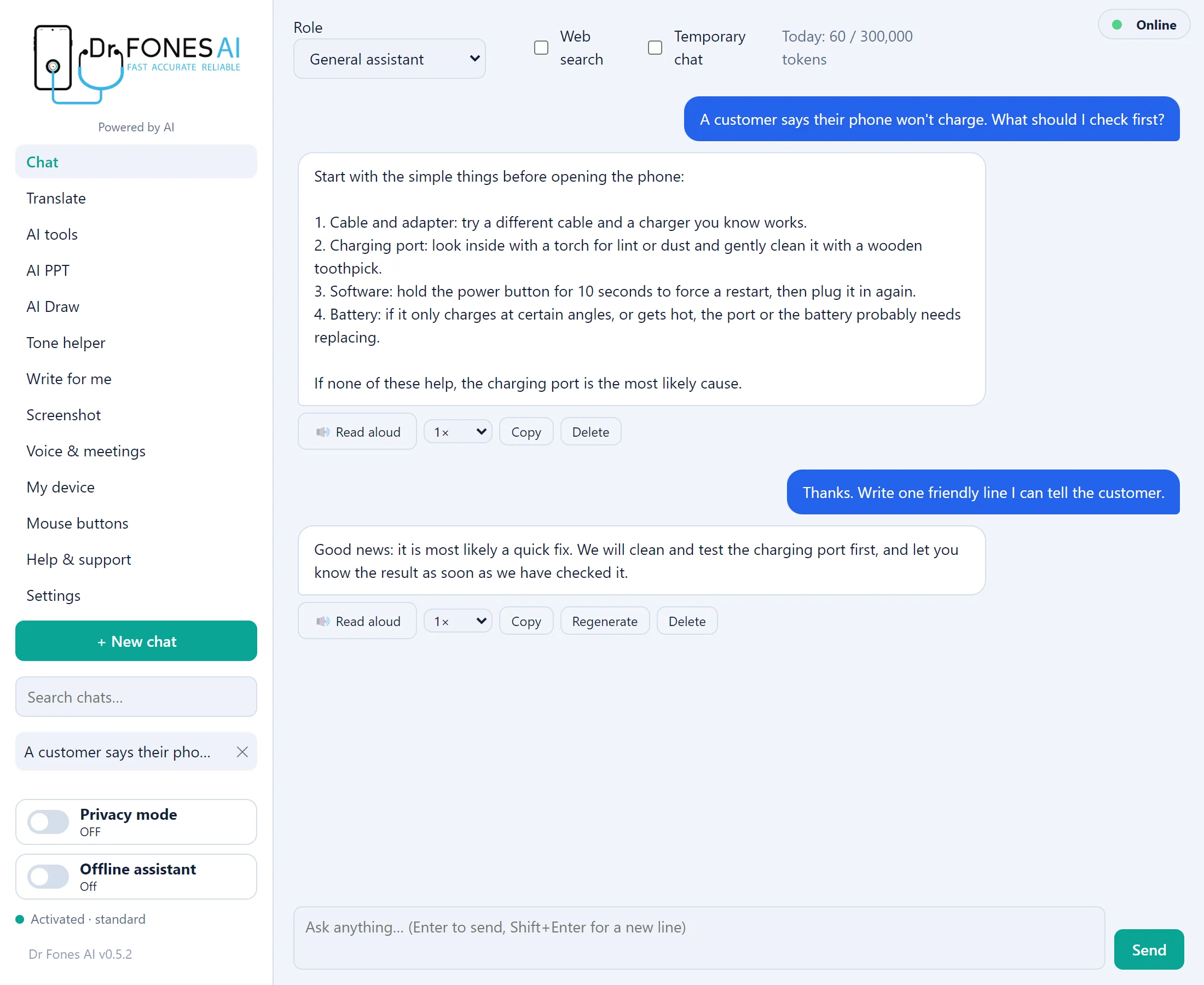
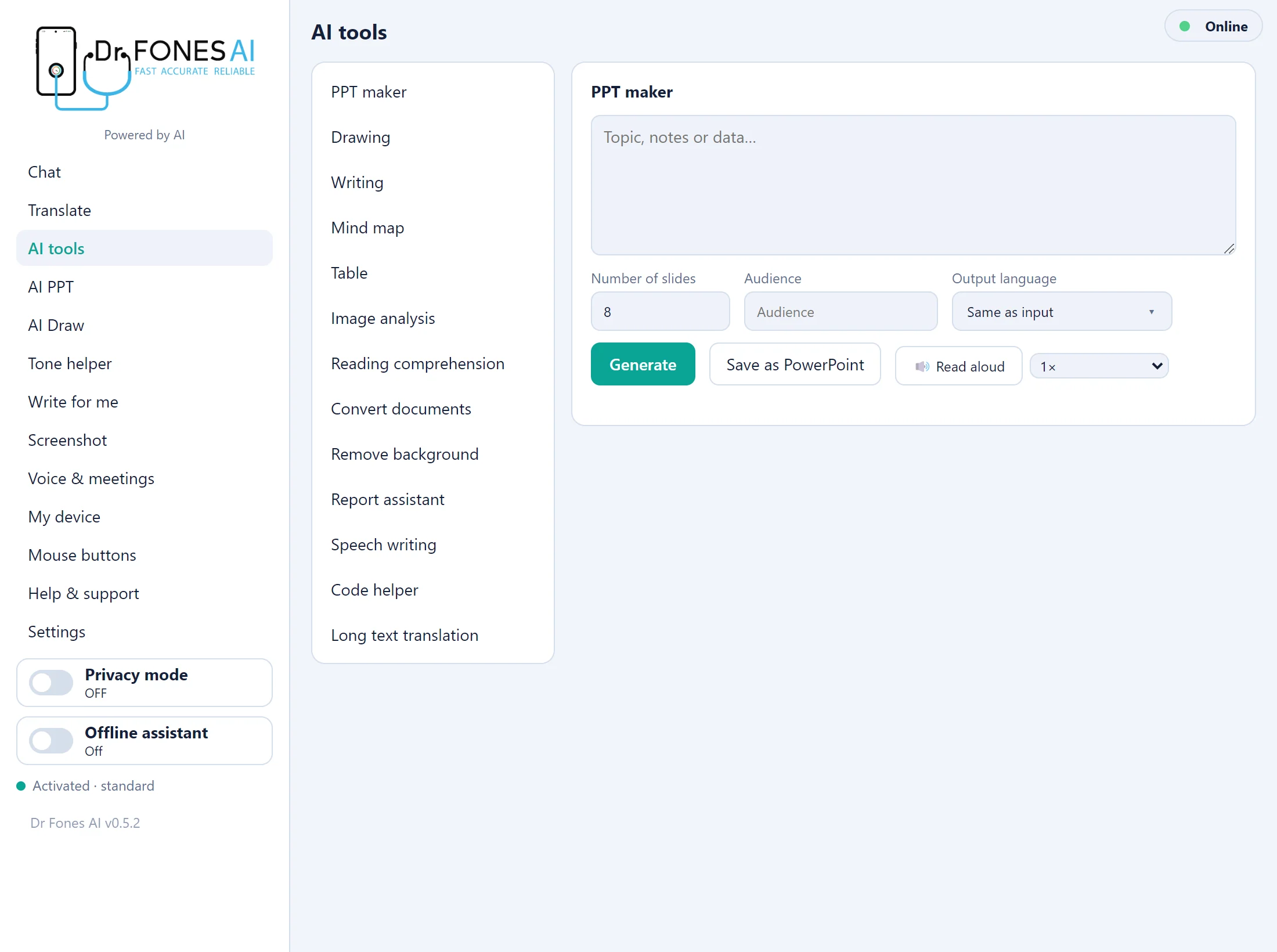
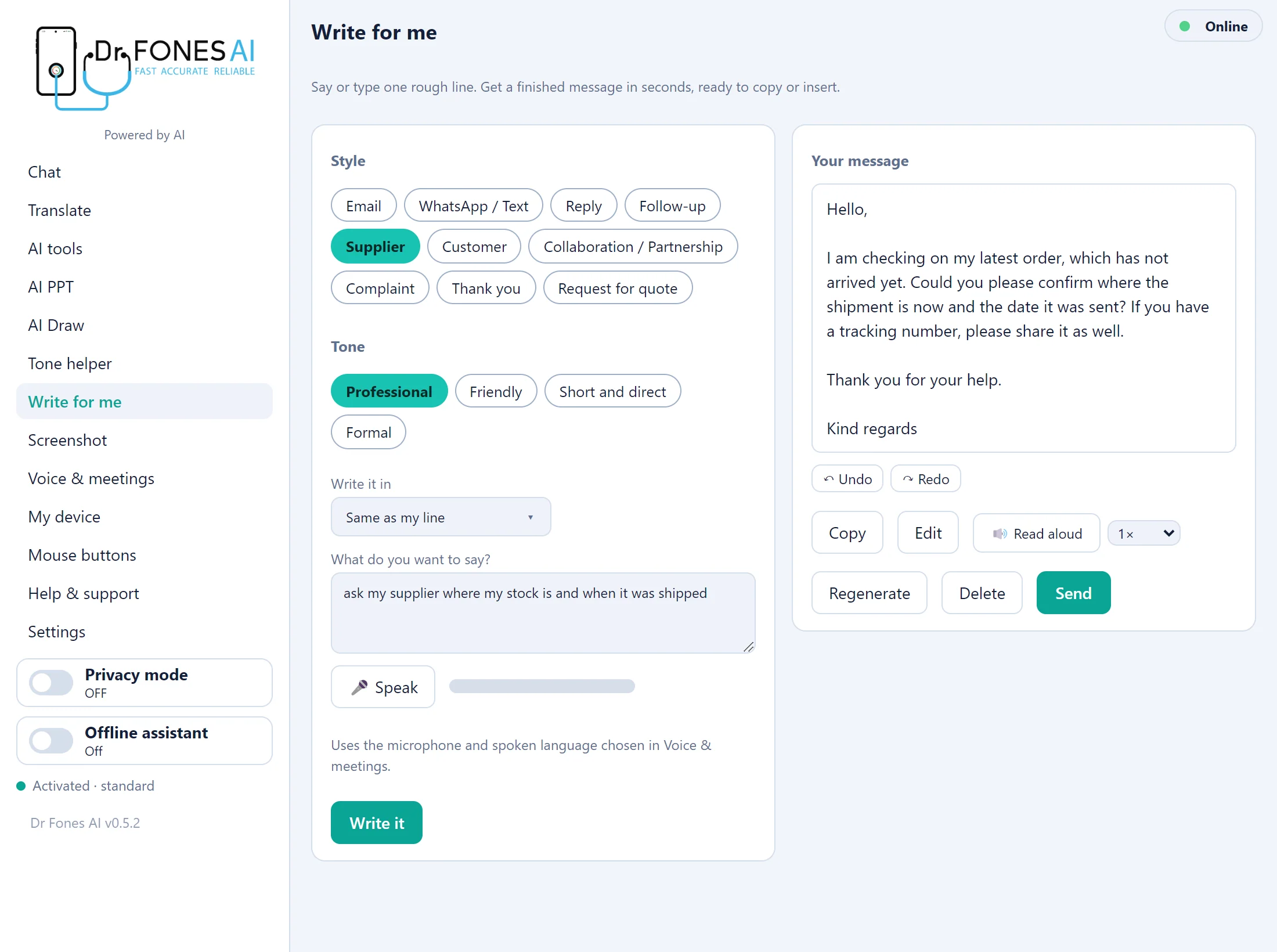
Free with every AI Mouse. The app makes the T and AI buttons work, and adds live translation, chat, writing tools and more to your Windows computer.

Download for Windows

Version 0.5.2 · 143 MB · Windows

Free with the AI Mouse. Makes the T and AI buttons work.

Windows may show a SmartScreen notice the first time because the app is new. Choose More info, then Run anyway.

Using a Mac? See all software downloads
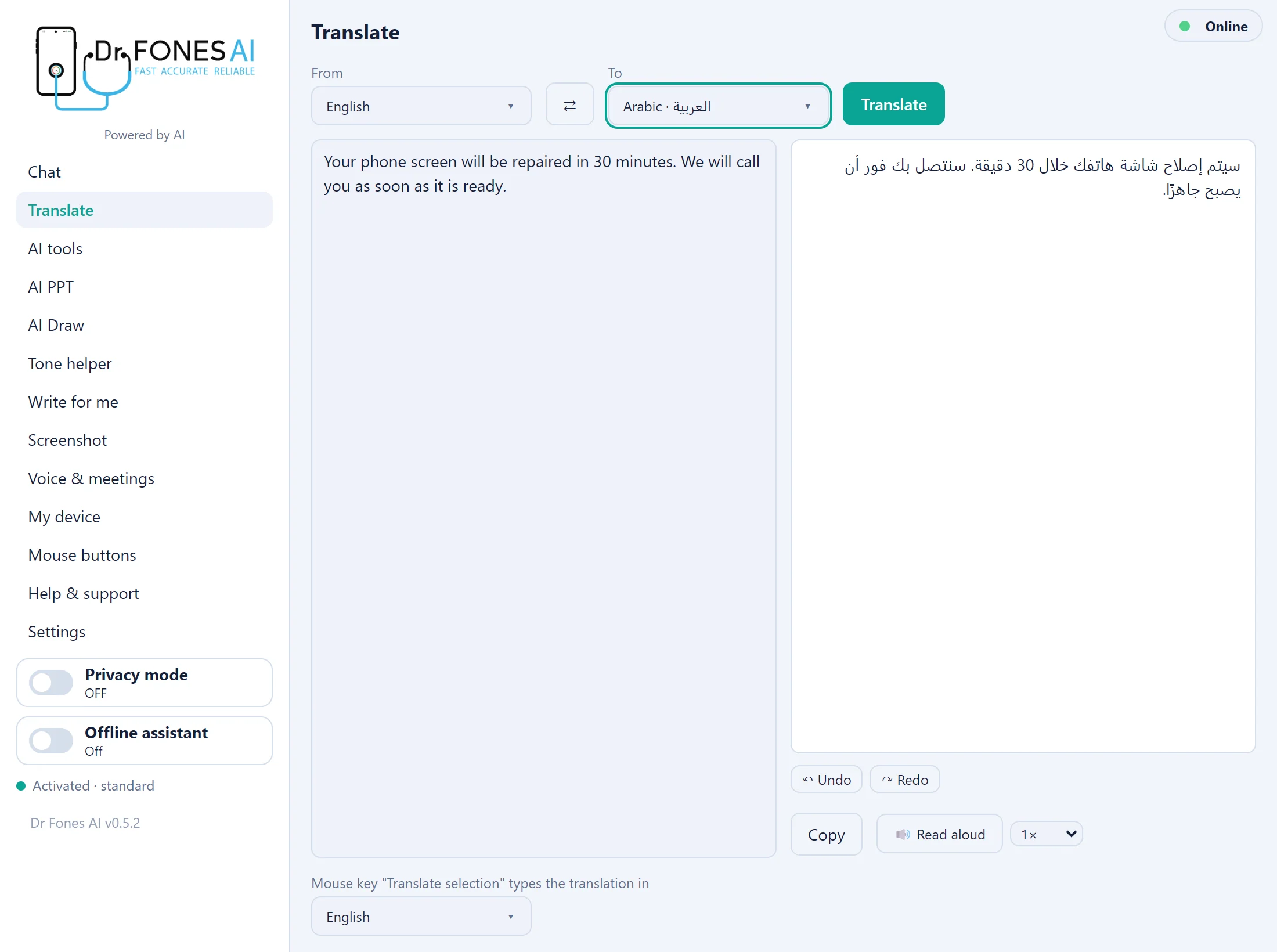
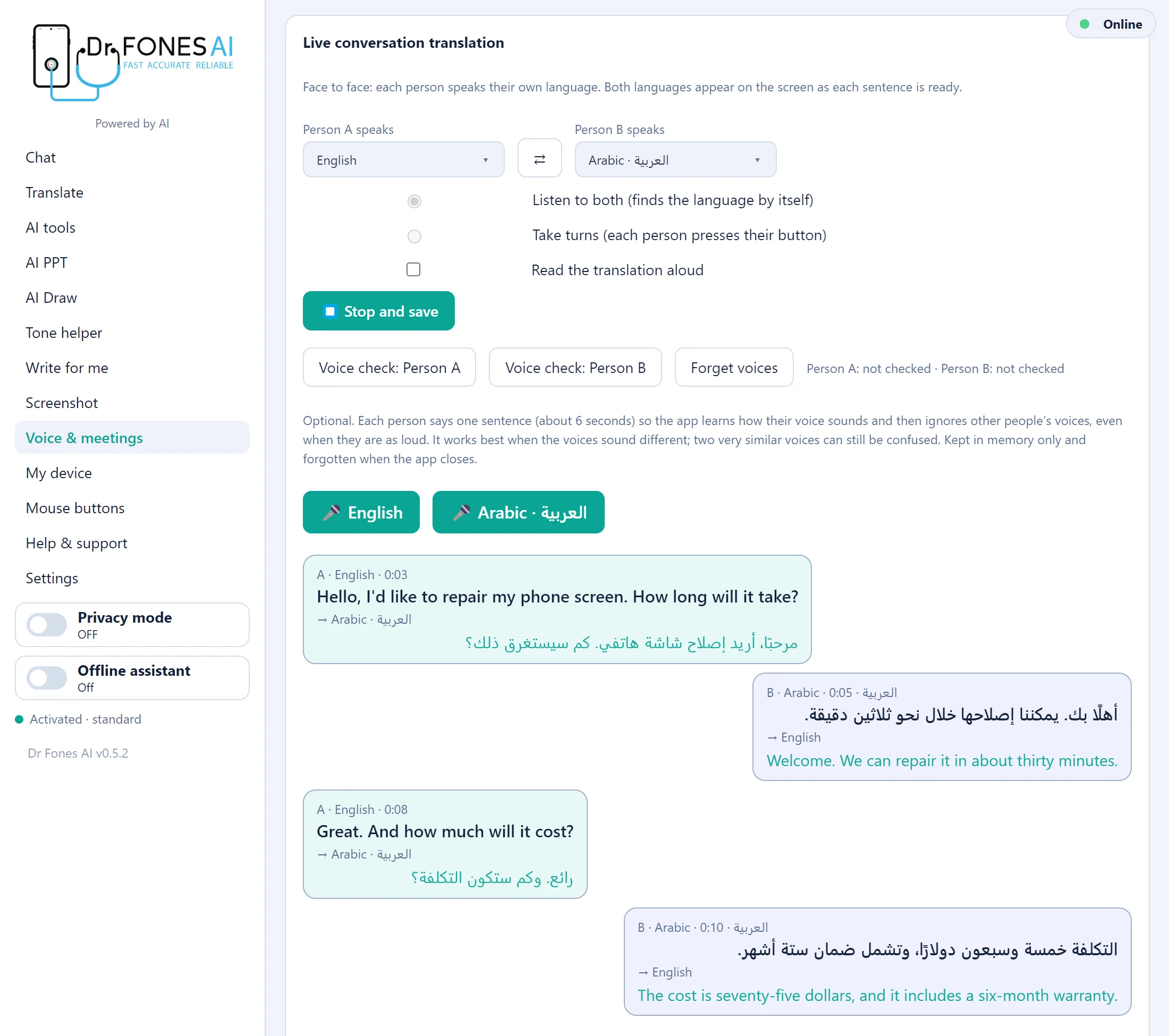
Dr Fones AI app, live conversation translation between English and Arabic
Live conversation translationFace to face: each person speaks their own language, and both languages appear on screen as each sentence is ready.

Example screens with sample text.

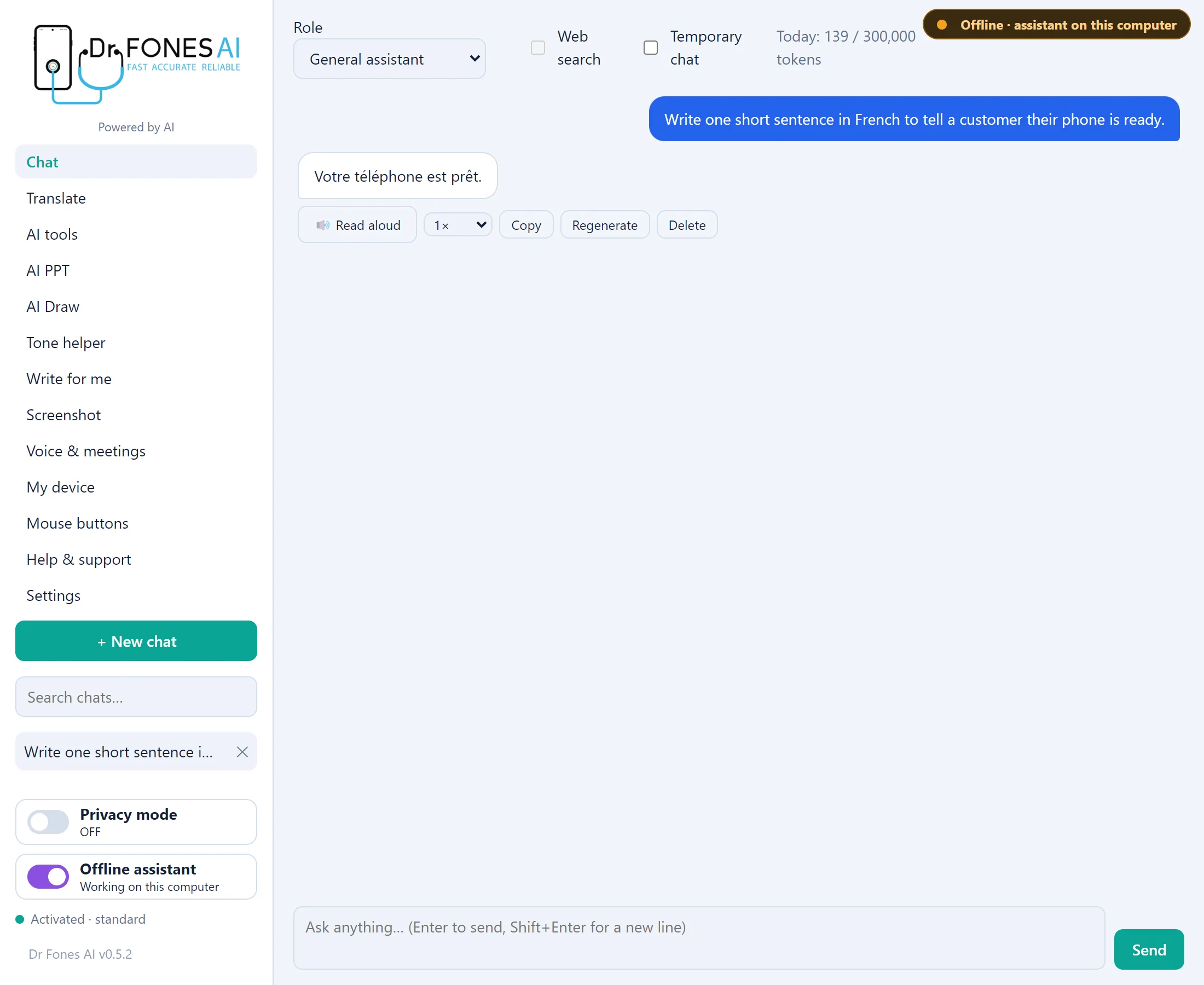
Offline assistant

Works even without internet

Switch on the offline assistant and keep working on your own computer when the connection is gone. Chat, translate and use voice typing without internet. While it is on, your work stays on this computer.

  • One switch in the sidebar
  • Download the offline pack once (about 2.7 GB)
  • Offline answers are slower than online ones
Dr Fones AI app with the offline assistant switched on, working on this computer

How it works in 3 steps

Press. Speak. It types.

Set up in about two minutes. No keyboard shortcuts to learn.

  1. Press

    Hold the Voice button on the side of the mouse, under your thumb.

  2. Speak

    Talk naturally in your own language. No commands to learn.

  3. It types

    Your words appear as text wherever your cursor is: email, chat, documents, forms.

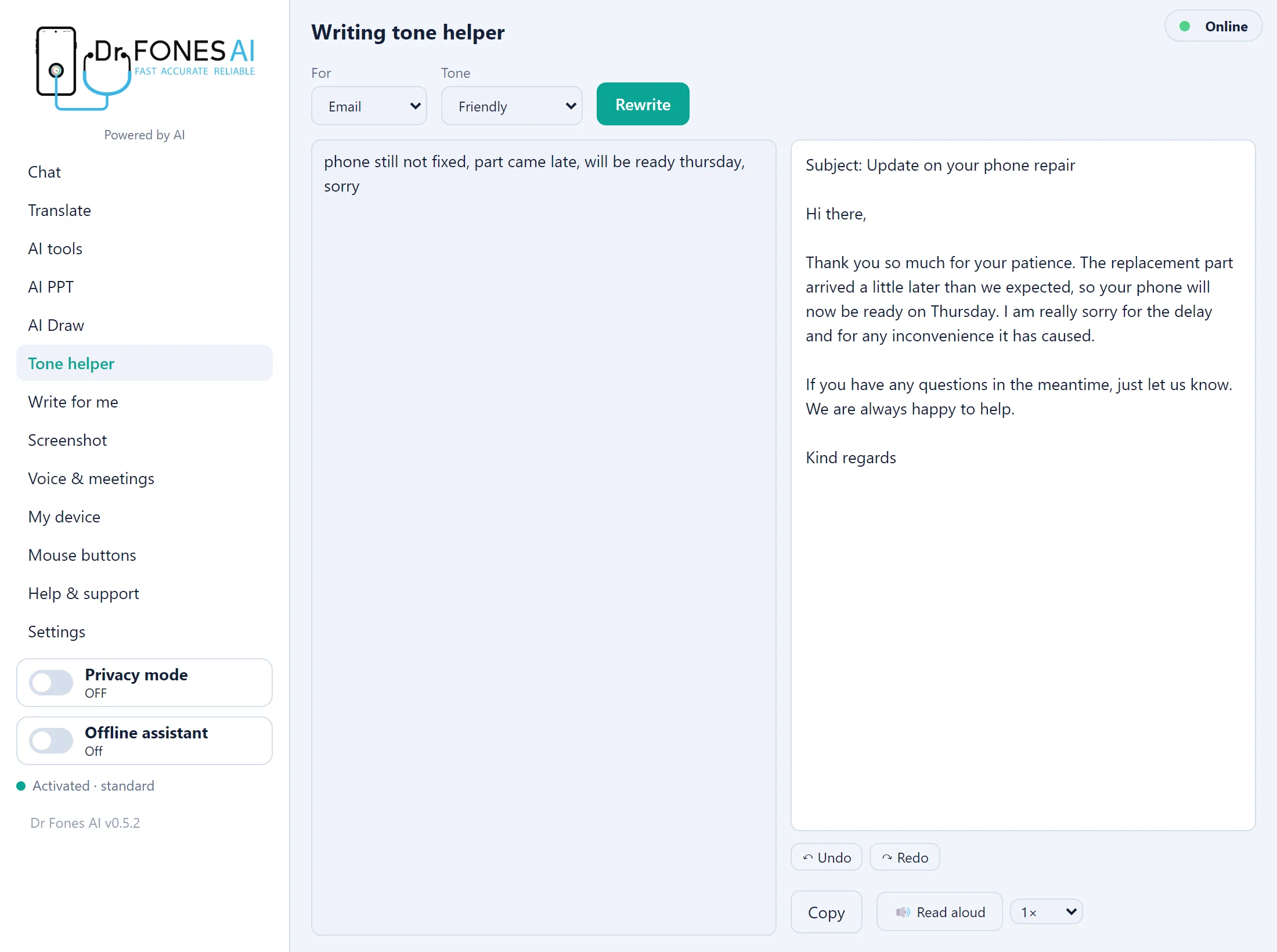
See it type

This is what happens on your screen while you talk.

Set up in about two minutes

  1. Connect the mouse

    The USB receiver is stored under the mouse. Plug it into your computer and switch the mouse on.

  2. Get the software

    Hold the scroll wheel for 8 seconds, or download it from this site for Windows or macOS.

  3. Choose your language

    Open Main Interface › Software Settings and pick the language you speak in.

  4. Hold and speak

    Click where you want to type, hold the Voice button and talk. Release, and the text appears.

Key features

Everything on the box, in one mouse.

Eight things the Dr Fones AI Mouse does for you every day.

One-click voice typing

Press, speak, and your words are typed.

AI shortcut access

Open the AI tools with one button.

Multi-platform AI support

Works with leading AI platforms and productivity tools.

ChatGPT & Gemini access included

Built in, with no subscription.

Instant translation support

Speak in one language, read in another.

Wireless connectivity

2.4GHz wireless with a USB receiver.

Use as a normal mouse

Point, click and scroll like any mouse.

Smart tools. Faster work.

Everything you need under your fingers.

Side of the Dr Fones AI Mouse box listing the key features

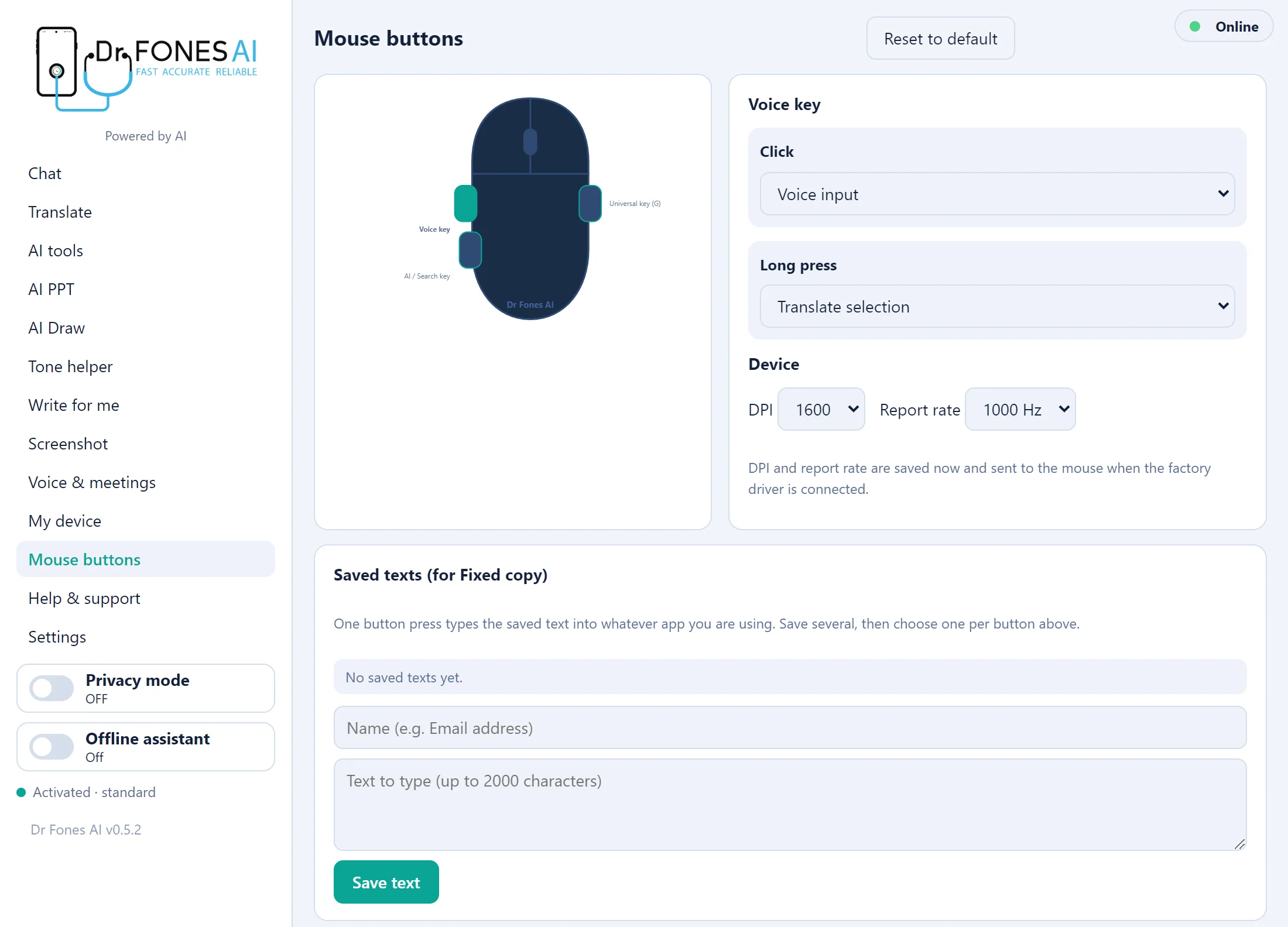
The four buttons

Everything happens under your fingers. Click where you want to type, then press and hold. No app switching, no keyboard needed.

Side, under the thumb

Voice to text

Hold the Voice button while speaking. Your speech is typed out in the same language, in any app: email, web chat, Word, a browser form.

Top, behind the wheel

Voice translation

Pick a target language in the software, then hold T and speak. You talk in your language, the text comes out in theirs.

Top, under the T

AI workspace

Press AI to open AI Chat, AI Presentation and AI Image tools. Ask a question, draft a reply or build slides in seconds.

Side, under the thumb

Custom G button

A multifunction button you set yourself in the Dr Fones AI Mouse software. Make it the shortcut you use most.

Also a normal mouse

Point, click and scroll like any wireless mouse. The AI buttons are there when you need them and out of the way when you don't.

2.4GHz wireless

USB receiver clips into the mouse, so it travels with it.

USB Type-C charging

Red light while charging, green when full. The software icon flashes when the battery is low.

Windows & macOS

Install the software once to unlock voice typing, translation and the AI workspace.

Supported languages

17 languages, including the ones others leave out.

Voice typing and translation for Urdu, Bengali, Persian and Kurdish as well as the world's major languages. Speak in one, translate into another. The quick start guide in the box is printed in 14 languages.

ENEnglish
ESSpanish
FRFrench
ARArabic
HIHindi
URUrdu
BNBengali
FAPersian
DEGerman
ITItalian
PTPortuguese
JAJapanese
ZHChinese
KOKorean
TRTurkish
KUKurdishSorani & Kurmanji
RURussian

Kurdish is supported in both Sorani and Kurmanji.

Technical specifications

The details.

Model
DF-AIM01
Sensor
Precision optical sensor
Connection
2.4GHz wireless, USB receiver stored in the mouse
Radio
2402–2480 MHz · max 0 dBm (1 mW)
Battery
Built-in rechargeable lithium, 400mAh (1.48Wh), charges over USB Type-C
Charging light
Red while charging, green when full
Rated input
DC 5V ⎓ 500mA
Buttons
Left, right, scroll wheel, AI, T, Voice, G
Compatibility
Windows & macOS
AI features
Voice typing, voice/text/image translation, AI Chat, Presentation and Image. ChatGPT and Gemini access built in
Languages
17
Certifications
CE · UKCA · FCC · RoHS · REACH · MIC Japan, listed on the earlier page. Confirm against the certificates before publishing
Battery safety
IEC 62133:2012 · UN3481 · MSDS available. Confirm against the test reports before publishing
Certificate IDs
FCC 2AYAETG01 · Japan 203-JN1271. Confirm before publishing
Origin
Designed by Dr Fones AI, assembled in China

Download the software

Install once to unlock voice typing, translation and the AI workspace.

Go to downloads

What's in the box

Everything you need to start.

Open the box, plug in the receiver and go.

  • Dr Fones AI Mouse
  • USB receiver
  • Type-C charging cable
  • Quick start guide (14 languages)
Front of the Dr Fones AI Mouse box, top half: AI MOUSE, Click. Speak. It Types.
Back of the Dr Fones AI Mouse box with highlights, specifications and what is in the box
Top of the Dr Fones AI Mouse box

No subscription

ChatGPT & Gemini access included.

Built in from the factory, with no subscription or extra charges. Also works as a normal wireless mouse.

ChatGPT access includedGemini access includedNo subscriptionNo extra charges

The AI workspace

ChatGPT and Gemini access are built into the mouse from the factory and included with it. There is no subscription to buy and no separate account to set up for these features.

AI Chat

Ask anything, draft replies to customers and suppliers, rewrite a message to sound more professional.

AI Presentation

Describe what you need and get a ready slide outline to present.

AI Image

Create images from a short description for posts, flyers and product ideas.

Text & image translation

Translate selected text, or pull the text out of a picture and translate it.

ChatGPT and Gemini access are built-in mouse features included at no additional cost. Other third-party AI services may require separate subscriptions, accounts or fees. Features and availability may vary by software version and region. Voice typing, translation and the AI workspace need an internet connection. ChatGPT is a trademark of OpenAI and Gemini is a trademark of Google LLC. Dr Fones AI is not affiliated with, sponsored or endorsed by either company.

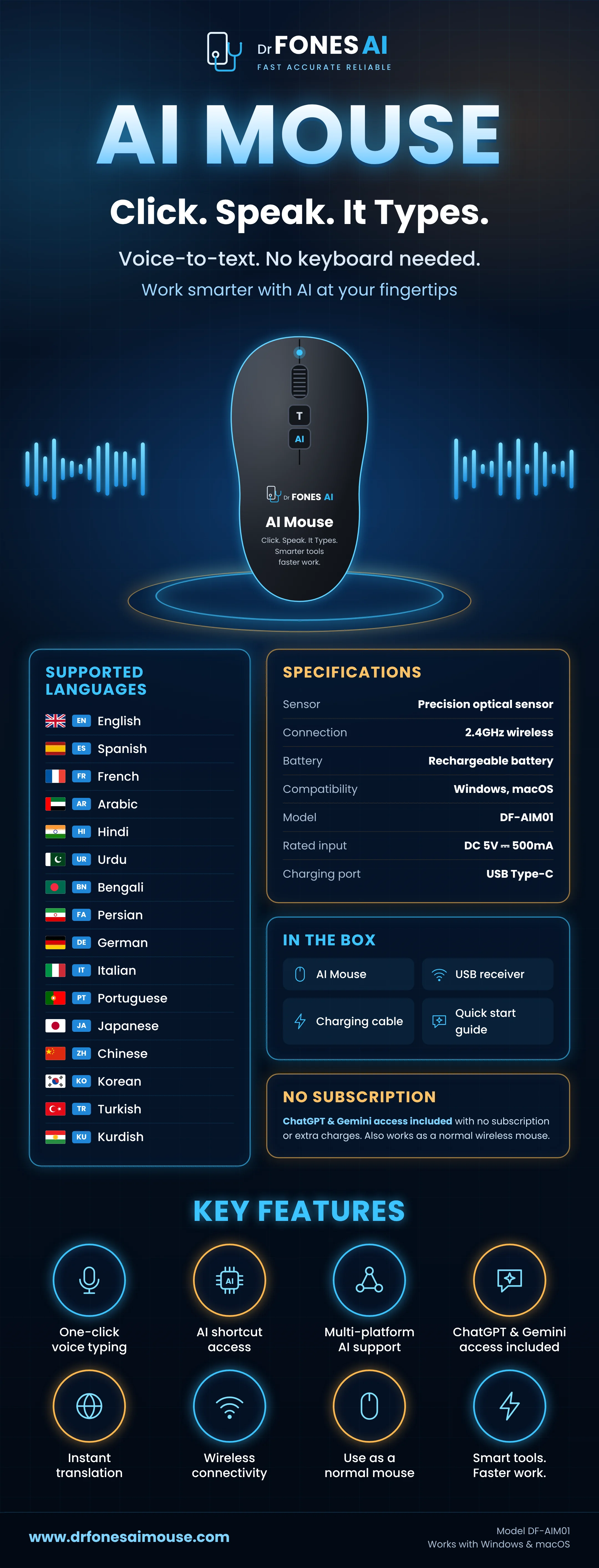
Catalogue

Everything on one page.

The full Dr Fones AI Mouse catalogue: features, languages, specifications and what is in the box.

FAQ

Questions.

Do I need to pay a subscription?

No. ChatGPT and Gemini access are built into the mouse from the factory and included at no extra cost. You do not need your own ChatGPT or Gemini subscription to use these built-in features. Other third-party AI services you connect yourself may have their own fees.

Which languages does it support?

17: English, Spanish, French, Arabic, Hindi, Urdu, Bengali, Persian, German, Italian, Portuguese, Japanese, Chinese, Korean, Turkish, Kurdish (Sorani and Kurmanji) and Russian. You can speak in one and translate into another.

Does it work as a normal mouse?

Yes. It is a full wireless mouse with left and right click and a scroll wheel. The AI, T, Voice and G buttons are extra.

Does it need an internet connection?

Voice typing, translation and the AI workspace need an internet connection. Pointing, clicking and scrolling work without one.

Does it work on Mac and Windows?

Yes. Install the Dr Fones AI Mouse software for Windows or macOS, then plug in the USB receiver.

How do I charge it?

Plug the Type-C cable from the box into any USB port or 5V charger. The light is red while charging and turns green when full. When the battery runs low, the software icon flashes.

Where does it type?

Wherever your cursor is: email, web chat, Word, Google Docs, browser forms and most other apps.

Is my data private?

Your personal usage data stays on your computer and is not collected or uploaded by the Dr Fones AI Mouse software. If you contact support through Main Interface › Feedback, the diagnostic logs you send do not contain personal data.

Where do I get help?

Open the software and go to Main Interface › Feedback to reach after-sales support, or contact our team using the form on this page.

Can I order in bulk?

Yes. Use the trade enquiry form with your quantity and country and our team will come back with pricing and delivery times.

Order

Order or ask us anything.

Chat with us on WhatsApp, send an email or fill in the form. Distributors and bulk buyers are welcome.

WhatsApp+971 50 108 2681

Emailsales@drfonesaimouse.com Confirm this mailbox is live
PhonePhone number to be added
AddressBusiness address to be added
CompanyDr Fones Ltd

Stock the Dr Fones AI Mouse.

Sells itself on the counter

Hold the button, speak, watch it type. Customers get it straight away.

No subscription to explain

ChatGPT and Gemini access built in, so there is no monthly fee to put buyers off.

Retail-ready packaging

Branded box with barcode, feature panels and a printed list of supported languages.

Built for multilingual markets

Arabic, Urdu, Hindi, Bengali, Persian, Kurdish and more, with a quick start guide in 14 languages.

Send a trade enquiry

Tell us who you are and what you need. We will come back with pricing and delivery times.